- Mar 20 Wed 2019 22:03
-
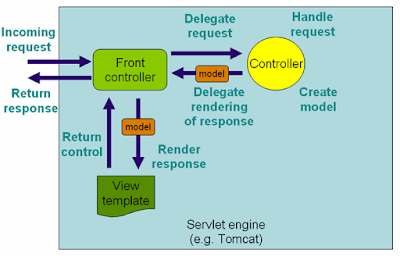
Spring Web MVC flow control

- Mar 19 Tue 2019 20:58
-
Things learned from software development
1. Start small, then extend. Whether creating a new system or adding a feature to an existing system, I always start by making a very simple version with almost none of the required functionality. Then I extend the solution step by step until it does what it is supposed to. I have never been able to plan everything out in detail from the beginning. Instead, I learn as I go along, and this newly discovered information gets used in the solution.
- Mar 18 Mon 2019 21:19
-
base 64 java encoding and decoding method
Until Java 8, there was no standard way to Base64 encode a String in Java or decode a base64 encoded String. Java Programmers either use Apache Commons library and it's Base64 class to encode or decode binary data into base 64 encoding or rely on internal Sun classes e.g. sun.misc.BASE64Encoder and sun.misc.BASE64Decoder(), which were not officially part of JDK and can be removed without notification. Java 8 solves this problem by providing standard support for base64 encoding and decoding by providing a java.util.Base64 class. This class contains methods like getEncoder() and getDecoder() to provide Base64 encoder and decoder to carry out base 64 encoding of String or binary data. In this article, I'll show you some example of how to base64 encode String in Java 8.
Java 8 provides three types of base64 encoding and corresponding built-in encoder and decoder, as shown below.
Basic Base64 Encoder
In this type of encoder, only characters A-Z a-z0-9+/ are used for base64 encoding. The encoder does not add any line feed in the output, and the decoder rejects any character other than A-Za-z0-9+/. That's why you see a big line of alphanumeric characters. This is the one you will use most likely and we'll see examples of this Base64 encoder in this tutorial.
You can use the static getEncoder() and getDecoder() method of Base64 class to obtain the basic base64 encoder and decoder and use their encode() and decode() for base64 encoding and decoding.
URL Base64 Encoder
This is similar to basic type but instead of "\", underscore ("_") is used i.e. only characters A-Za-z0-9+_ are supported. The key point about this encoder is that output is also URL and filename safe because there is no "\" character which acts as the path separator in many operating systems e.g. Windows.
You can use the getUrlEncoder() and getUrlDecoder() method to get the encoder and decoder who can perform this type of base64 encoding.
MIME Base64 Encoder
This is the third type of base64 encoding supported by Java 8. In this case, the output is mapped to MIME-friendly format. The output is represented in lines of no more than 76 characters each and uses a carriage return '\r' followed by a linefeed '\n' as the line separator. No line separator is present to the end of the encoded output.
You can use the static method getMimeEncoder() and getMimeDecoder() to get the MIME type base64 encoder and decoder with specified line length and line separators.
Java 8 provides three types of base64 encoding and corresponding built-in encoder and decoder, as shown below.
Basic Base64 Encoder
In this type of encoder, only characters A-Z a-z0-9+/ are used for base64 encoding. The encoder does not add any line feed in the output, and the decoder rejects any character other than A-Za-z0-9+/. That's why you see a big line of alphanumeric characters. This is the one you will use most likely and we'll see examples of this Base64 encoder in this tutorial.
You can use the static getEncoder() and getDecoder() method of Base64 class to obtain the basic base64 encoder and decoder and use their encode() and decode() for base64 encoding and decoding.
URL Base64 Encoder
This is similar to basic type but instead of "\", underscore ("_") is used i.e. only characters A-Za-z0-9+_ are supported. The key point about this encoder is that output is also URL and filename safe because there is no "\" character which acts as the path separator in many operating systems e.g. Windows.
You can use the getUrlEncoder() and getUrlDecoder() method to get the encoder and decoder who can perform this type of base64 encoding.
MIME Base64 Encoder
This is the third type of base64 encoding supported by Java 8. In this case, the output is mapped to MIME-friendly format. The output is represented in lines of no more than 76 characters each and uses a carriage return '\r' followed by a linefeed '\n' as the line separator. No line separator is present to the end of the encoded output.
You can use the static method getMimeEncoder() and getMimeDecoder() to get the MIME type base64 encoder and decoder with specified line length and line separators.
- Mar 16 Sat 2019 22:34
-
RestController and Controller
Now that, you are familiar with both of these annotations, it's a good time to analyze some factual difference between @RestController and @Controller. This is a very important concept, not just from the Interview point of view but also from Spring Core Developer Certification.
If you are preparing for Spring certifications, you should familiar with such subtle differences. Additionally, you can also take a look at free Spring tests to get an idea about exam format and level of questions.
Anyway, let's get back to the point, here are some important differences between these two annotations.
1. The @Controller is a common annotation which is used to mark a class as Spring MVC Controller while @RestController is a special controller used in RESTFul web services and the equivalent of @Controller + @ResponseBody.
2. The @RestController is relatively new, added only on Spring 4.0 but @Controller is an old annotation, exists since Spring started supporting annotation, officially it was added on Spring 2.5 version.
3. The @Controller annotation indicates that the class is a "Controller" like a web controller while @RestController annotation indicates that the class is a controller where @RequestMapping methods assume @ResponseBody semantics by default i.e. servicing REST API.
- Mar 14 Thu 2019 21:10
-
How to write sql queries effectively

There is no doubt that writing code is more art than science, every coder cannot write beautiful code which is both readable and maintainable, even with experience. In general, coding improves with experience when you learn the art of coding
- Mar 09 Sat 2019 22:04
-
Features java programming
“When it comes to functional programming, currently we do see a lot of legacy code bases jumping directly to this new paradigm ending up being more complex and difficult to maintain,” says Paris Apostolopuolos, software engineer and blogger. “Java, while making steady progress on adopting even more functional programming constructs, is still an object-oriented language and this ‘dual’ personality sometimes might prove to be handy.
- Mar 06 Wed 2019 21:40
-
String and String builder and String buffer
Today we are going to understand the difference between String , StringBuilder and StringBuffer . As you will find that there are minor differences
between the above mentioned classes.
between the above mentioned classes.
- Mar 05 Tue 2019 22:21
-
Java web app with spring framework - Features
Spring is an open source framework created to address the complexity of enterprise application development. One of the chief advantages of the Spring framework is its layered architecture, which allows you to be selective about which of its components you use while also providing a cohesive framework for J2EE application development . If you may also go through spring boot interview questions for interview question on Spring.
- Mar 04 Mon 2019 19:23
-
Java exception handling explained
Exception handling in Java is made possible through the use of some keywords like try, catch, throw, throws, and finally. These keywords are used to manage how exceptions are thrown and handled.
1
